InstaSaver DP – Download Instagram Profile Picture in Full HD 1080p
Zoom, view and download anyone's Instagram Profile Picture (DP / Avatar) in original Full HD 1080p for free.
Download Instagram Profile Picture in Full Resolution
InstaSaver Instagram DP Downloader allows you to zoom in and download any Instagram user's profile avatar in original Full HD 1080p resolution. Instagram displays tiny circular profile pictures and prevents users from zooming in or saving them, but InstaSaver fetches the uncompressed original image.
Simply enter the Instagram username (with or without @) or paste their profile URL into the box above. In seconds, you can preview their full-sized avatar and download the high-resolution JPG file directly to your phone or computer.
InstaSaver: Online Instagram Downloader
Why Choose InstaSaver DP Downloader?
The easiest way to view and save Instagram profile pictures in maximum resolution.
Full HD Zoom
View profile pictures in full size 1080p without pixelation or tiny crop circles.
Works on All Accounts
View avatars for both public and private Instagram accounts seamlessly.
Username or URL
No link required! Simply type any username (e.g. cristiano) to fetch the avatar instantly.
100% Anonymous
The account owner will never know you viewed or saved their profile picture.
Mobile Friendly
Fast and responsive on iPhone Safari, Android Chrome, and desktop browsers.
Free & Unlimited
Unlimited searches and downloads with zero subscription or registration fees.
How to Download Instagram Profile Pictures with InstaSaver
Open Instagram, go to the profile you want to inspect, copy their username (or tap the 3 dots and tap "Copy Profile URL").
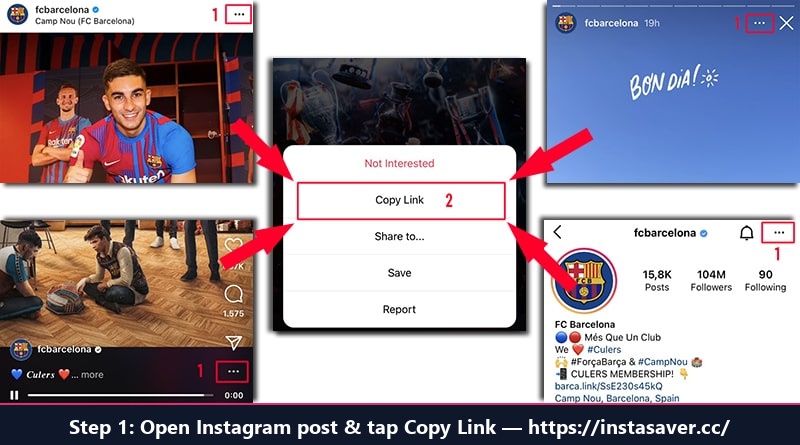
Step 1: Open Instagram, tap Share and select "Copy Link"
Open InstaSaver.cc/instagram-profile-download.php, paste the username or profile link, and click "Download".
View the enlarged high-definition avatar photo and click "Download HD Profile Picture" to save the JPG file to your device gallery.
Frequently Asked Questions (FAQ)
Common questions about downloading Instagram profile pictures
Can I view full size profile pictures of private Instagram accounts?
Yes. Instagram profile pictures are always public even if the account posts are private. Our tool can display and download the full-size profile avatar for any account.
Do I need to log into Instagram?
No. You do not need an account or password. Everything is anonymous and completely free.
Can I just type the username?
Yes! You don't have to copy the link. Simply typing their handle (e.g. cristiano) will fetch the full-size profile photo.