InstaSaver Reels – Download Instagram Reels in Full HD 1080p
Download Instagram Reels with audio in crisp Full HD 1080p MP4 format for free without watermark.
Download Instagram Reels with Audio in Full HD 1080p
InstaSaver Instagram Reels Downloader is the premier online tool that allows you to download and save short viral Instagram Reels videos directly to your smartphone, tablet, or PC in original 1080p Full HD MP4 video with full crystal-clear audio.
Instagram doesn't let you save Reels with music to your phone gallery directly, but with InstaSaver, all you need is the Reel URL. Our tool strips watermarks, preserves full bitrate audio and video, and lets you download both the MP4 video and isolated MP3 soundtrack in just one click.
InstaSaver: Online Instagram Downloader
Why Choose InstaSaver Reels Downloader?
The fastest, cleanest, and most reliable Instagram Reel video saving platform.
Original Audio Track
Never lose sound quality. Save Reels with 100% original background music, sound effects, and voice.
No Watermark
Get clean, authentic MP4 video files without annoying app watermarks or username overlays.
High Speed Download
High-speed servers process and deliver direct download links in under 3 seconds.
Extract MP3 Audio
Want just the trending song or voiceover? Download the audio track directly as an MP3 file.
All Devices Supported
Seamlessly compatible with iPhone (Safari), iPad, Android, Windows PC, and Mac without extra software.
100% Free & Anonymous
No login or registration required. Unlimited downloads 24/7 completely free of charge.
How to Download Instagram Reels with InstaSaver
Open Instagram, view the Reel you want to save, tap the Share icon () and choose "Copy Link".
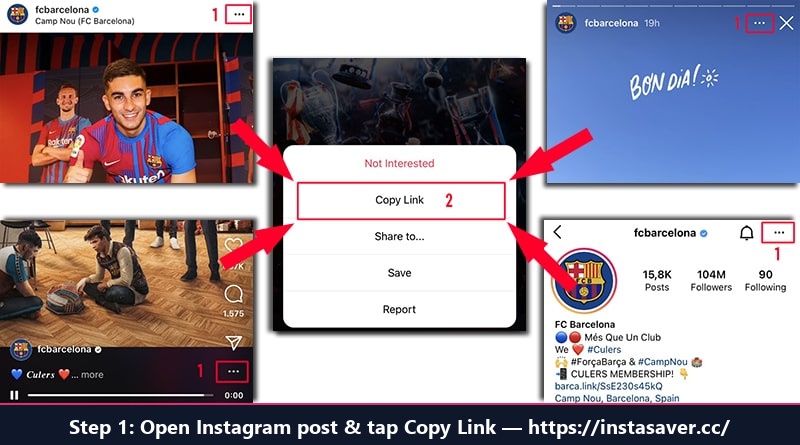
Step 1: Open Instagram, tap Share and select "Copy Link"
Open InstaSaver.cc in your mobile or computer browser, paste the URL into the input field above, and click "Download".
Preview the video player and click "Download Video (HD)" to save the crystal-clear Reel directly to your phone gallery or computer.
Download Instagram Reels on Any Device
How to save Instagram Reels on iPhone / iPad (iOS)
Copy the Reel link on Instagram, open Safari on your iPhone, visit InstaSaver.cc/instagram-reels-download.php, paste the link and tap Download. Tap "Download Video (HD)", tap the download icon in Safari, open the video, tap Share and select "Save Video" to add it to your Photos camera roll.
How to save Instagram Reels on Android
On Android, copy the Reel link from the Instagram app, open Chrome or your preferred browser, paste the link into InstaSaver and tap Download. Tap "Download Video (HD)" to save directly into your phone's Downloads folder and view it in Google Photos or Gallery.
How to download Instagram Reels on PC / Mac
On desktop or laptop, copy the Reel URL from your browser address bar. Paste it into InstaSaver and click Download. Click "Download Video (HD)" to save the 1080p MP4 video file to your computer.
Frequently Asked Questions (FAQ)
Everything you need to know about downloading Instagram Reels with InstaSaver
Can I download Reels with the original sound and music?
Yes! Our tool extracts the video with the exact audio track included in the Reel. You can also download the audio separately as an MP3 file if you only want the song or soundtrack.
Does InstaSaver place watermarks on downloaded Reels?
No. Every video downloaded from InstaSaver is 100% clean and free of watermarks or logos.
How do I save Instagram Reels on iPhone or iPad?
On iOS, copy the Reel link, open Safari, visit InstaSaver.cc, paste the link and tap Download. Tap "Download Video (HD)", then tap the blue download icon in Safari, open the file, tap Share and select "Save Video" to save it directly into your Photos Camera Roll.
Where are downloaded Reels stored on Android?
On Android devices, videos are saved directly into your device's Downloads folder and will immediately be visible in your Gallery or Google Photos app under Downloads.
Can I download Reels from private accounts?
No. InstaSaver respects privacy rules and only supports downloading Reels from public Instagram accounts.
Is this Reels Downloader free to use?
Yes, InstaSaver is 100% free with unlimited downloads. There are no fees, subscriptions, or login requirements.