
InstaSaver Story – Download Instagram Stories Online Anonymously Free
Save expiring Instagram stories, video highlights, and photos in original Full HD quality without anyone knowing.
Save and Watch Instagram Stories Anonymously in Full HD
InstaSaver Instagram Story Downloader is the most reliable online tool to view and download Instagram stories and highlights without leaving any trace. When you view a story on Instagram, your profile is permanently recorded in the publisher's viewer list. With InstaSaver, you can watch and save any public story or video highlight in complete privacy with 100% Ghost Mode.
Instagram stories automatically disappear after 24 hours, but our high-speed servers allow you to archive them permanently in crisp 1080p MP4 video format (with original audio) or high-resolution JPG images directly to your mobile phone or PC.
InstaSaver: Online Anonymous Instagram Story Downloader
Why Choose InstaSaver for Instagram Story Saving?
The ultimate anonymous story viewer and downloader built for speed, privacy, and full quality preservation.
100% Ghost Mode
View and download stories completely anonymously. The account owner will never know you watched their content.
Full HD Video & Audio
Saves video stories in high-definition 1080p MP4 with original background music, voices, and sound effects.
Highlight Albums Support
Extract all active stories and permanent pinned highlight albums directly by link or account username.
Permanent Archiving
Never lose temporary stories before the 24-hour expiration timer runs out. Save them directly to your gallery.
iOS & Android Compatible
Works seamlessly on iPhone (Safari), iPad, Android, Samsung, Mac, and Windows PC without apps.
Free & Unlimited
No registration, credit card, or download caps. Download unlimited stories and highlights 24/7.
How to Download Instagram Stories Anonymously
Open the Instagram app, tap the three dots () or Share button on the story and select "Copy Link" (or simply enter the username like @cristiano).
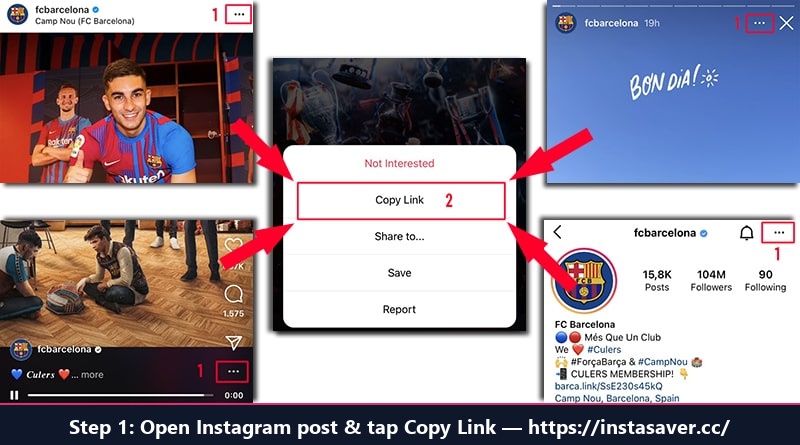
Step 1: Open Instagram Story, tap Share and select "Copy Link"
Open InstaSaver.cc in your browser, paste the copied link into the input field above, and click "Download".
Our engine will display the story video or photo. Tap "Download Story" to save the original high-definition file directly to your device gallery without the user knowing.
Download Instagram Stories on Any Device
How to save Instagram stories on iPhone / iPad (iOS)
On iPhone, copy the story link from Instagram. Open Safari, visit InstaSaver.cc/instagram-story-download.php, paste the link and tap Download. Tap "Download Story", and Safari will automatically save the MP4 video directly to your Files or Camera Roll Photos app.
How to save Instagram stories on Android
On Android, copy the story link, open Chrome or Samsung Internet, paste the link on InstaSaver and tap Download. Tap "Download Story" and the video will be instantly saved to your phone's Downloads folder and viewable in your Gallery.
How to download Instagram stories on PC / Mac
On desktop or laptop, copy the story URL from your browser address bar. Paste it into InstaSaver and click Download. Click "Download Story" to save the MP4 video or JPG photo in original resolution to your computer.
Frequently Asked Questions (FAQ)
Everything you need to know about anonymous story downloading with InstaSaver
Does the owner know that I watched or saved their story?
No, absolutely never. When you use InstaSaver, the story is fetched anonymously via our private proxy servers without your account being logged in. The creator will not see your name or username in their story views list.
Can I download story highlights that are older than 24 hours?
Yes! You can paste the link to any active Instagram Highlight album and download all individual video and photo stories saved inside that highlight.
Are downloaded stories saved with audio and sound?
Yes! All video stories are downloaded in crisp MP4 format with full original audio, background music, voiceovers, and sound effects intact.
Can I download stories from private Instagram profiles?
No. In accordance with digital privacy standards and Instagram policies, InstaSaver only accesses and downloads content from public Instagram accounts.
Do I need to enter my Instagram account credentials?
Never! You do not need to provide an Instagram username, password, or cookies. Our tool is 100% cloud-based and accessible directly from your browser.
Is this Instagram Story Downloader free?
Yes, InstaSaver Story Downloader is 100% free with unlimited usage. You can download as many stories as you want with zero fees.